Client
Bannerflow
Date
November 2025
Timeline
2 month project
Designing Within the Limits of What's Actually Solvable
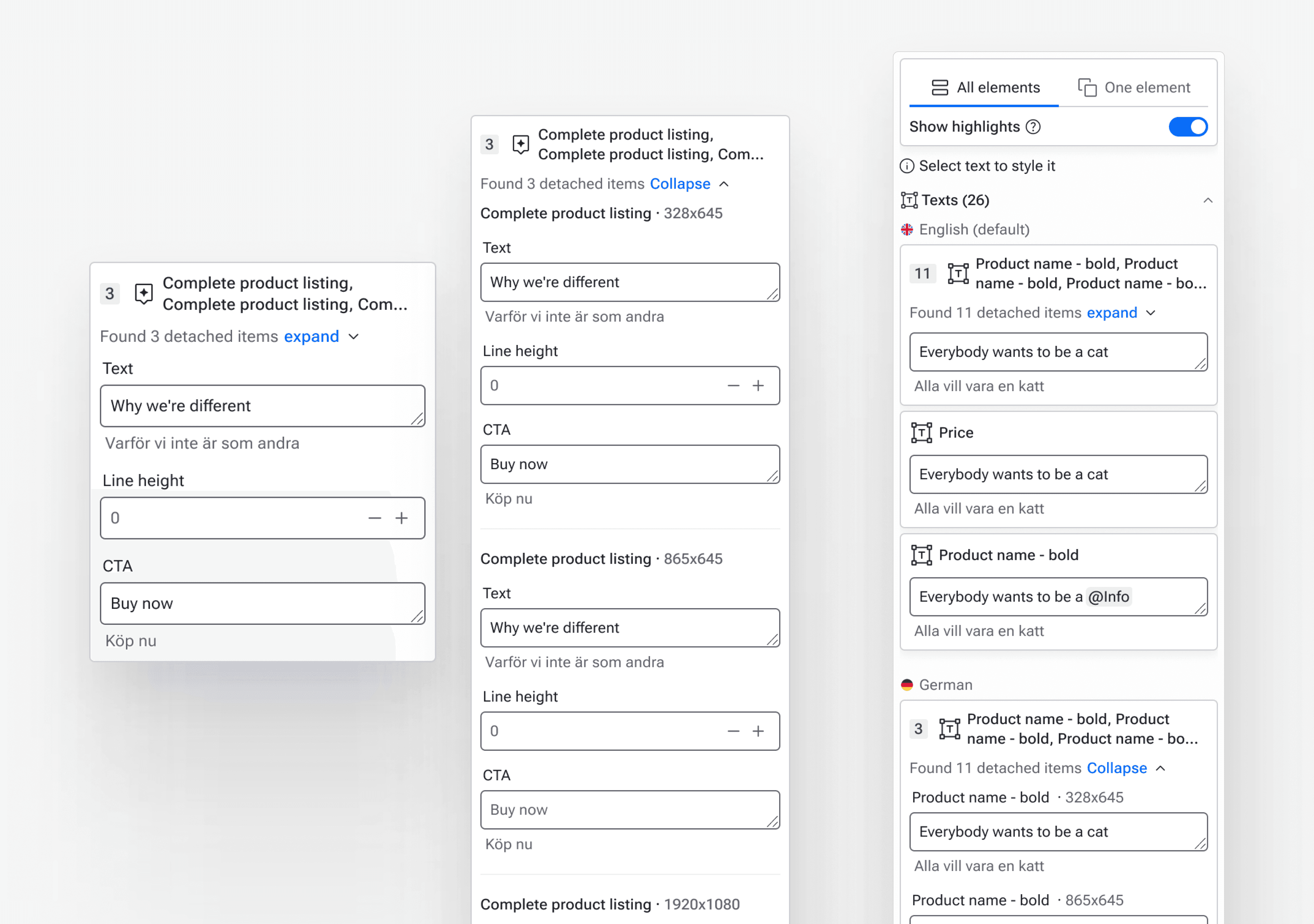
The feature nobody talks about, but everyone depends on
Content & Styling (C&S) sits quietly between Creative Studio and live campaigns. It's not the flashiest part of the Bannerflow platform, but for campaign managers handling dozens of sizes, multiple markets, and several language versions simultaneously, it's where their day actually happens. It's the control panel for what an ad says and how it looks, without forcing non-designers back into the complexity of the editor.
When I picked up this project, the brief was deceptively simple: users are struggling to navigate the feature. Figure out what we can do about it.
What I found was considerably more complicated.
Background
Project Overview
The product
Bannerflow is a Creative Automation Platform used by in-house marketing and creative teams to handle the full lifecycle of digital advertising, from building HTML5 ads in Creative Studio to publishing and managing campaigns across 100+ channels.
Content & Styling sits between the editor and live campaigns: it's the control panel where users manage copy, translations, feeds, and styling across many sizes and language versions without touching the underlying design.
My Role & Team
I had full design ownership across the project, from diagnosis through to shipped UI.
I worked in close collaboration with;
1 PO
1 Small engineering team
1 Support - Served as a direct pipeline to real customer feedback throughout.
Constraints
Custom widget system owned by a separate team — architectural restructuring out of scope
Core scaling algorithm changes required cross-team investment beyond this cycle
Design had to work within the existing technical reality, not reshape it
Users & Audience
Campaign managers in mid-to-large orgs — primary users, non-designers managing content at scale
Designers in smaller teams where roles overlap — secondary users
"Unicorns" handling both design and campaign management — outlier segment in leaner setups
Tools Used
Figma – Design
FigJam - Analysis & planning
Notion – Design rationale
Direct account access - Analyze live customer setups
Process
Listening to what users were actually saying
The starting point was a handover from the product owner, a collection of customer feedback gathered through CSM and support channels over the past year. Individually, the comments read like a typical mix of surface complaints and feature requests. Taken together, they pointed at something more structural.
I grouped the feedback thematically, then pushed further, trying to derive the underlying user needs behind each cluster rather than treating the symptoms as the problem itself. Where the data felt thin, I went directly into customer accounts, interacting with real setups from the users who'd been leaving feedback. That's where the real picture started to emerge.
The issues weren't random. They had a shape.
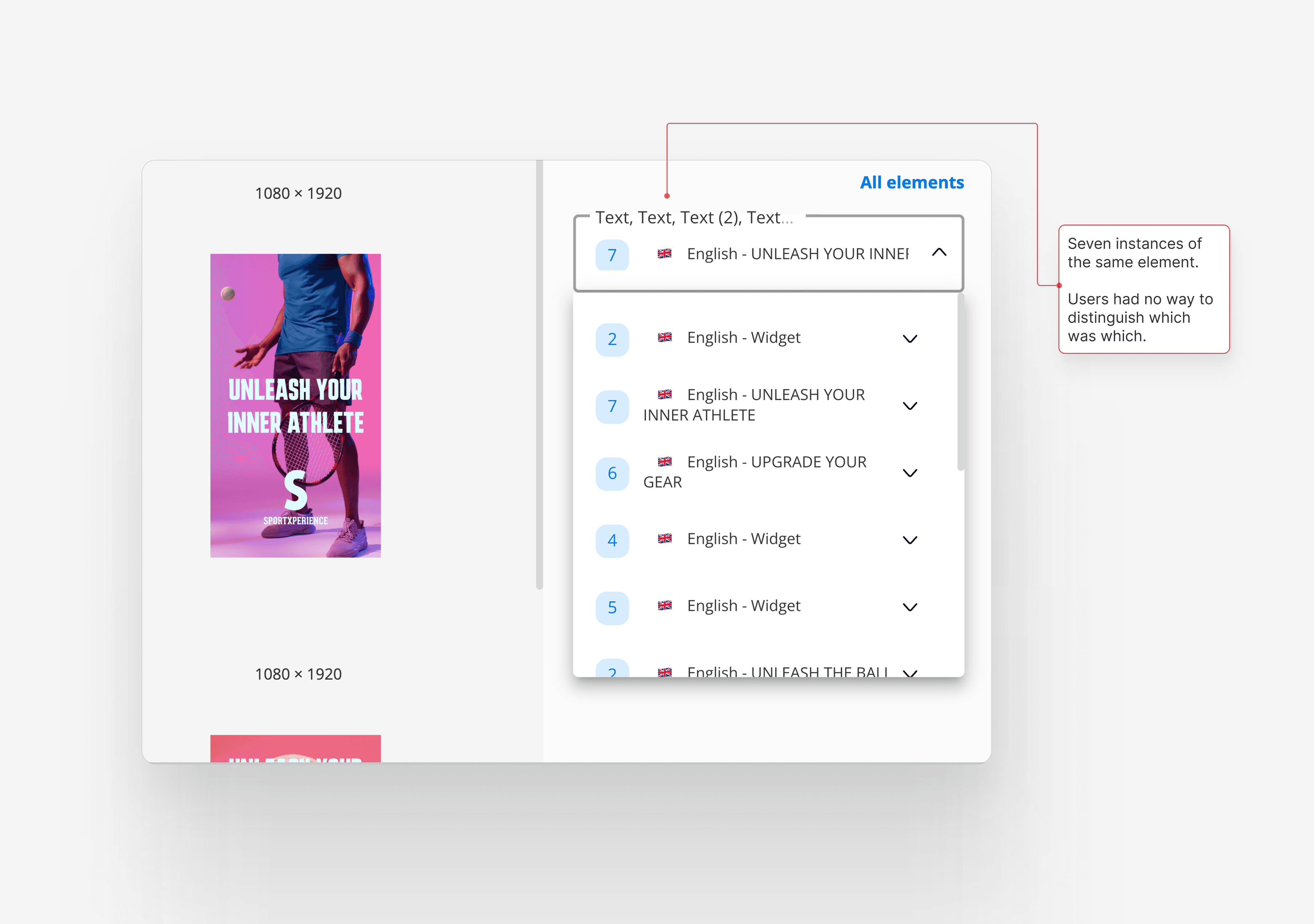
Element dropdown selector with several disconnected elements
Users were getting lost in an overwhelming list of fields. They couldn't tell where one element ended and another began. They couldn't easily distinguish between different types of fields. And the sheer volume of content in the panel made it nearly impossible to orient themselves before they even started editing.
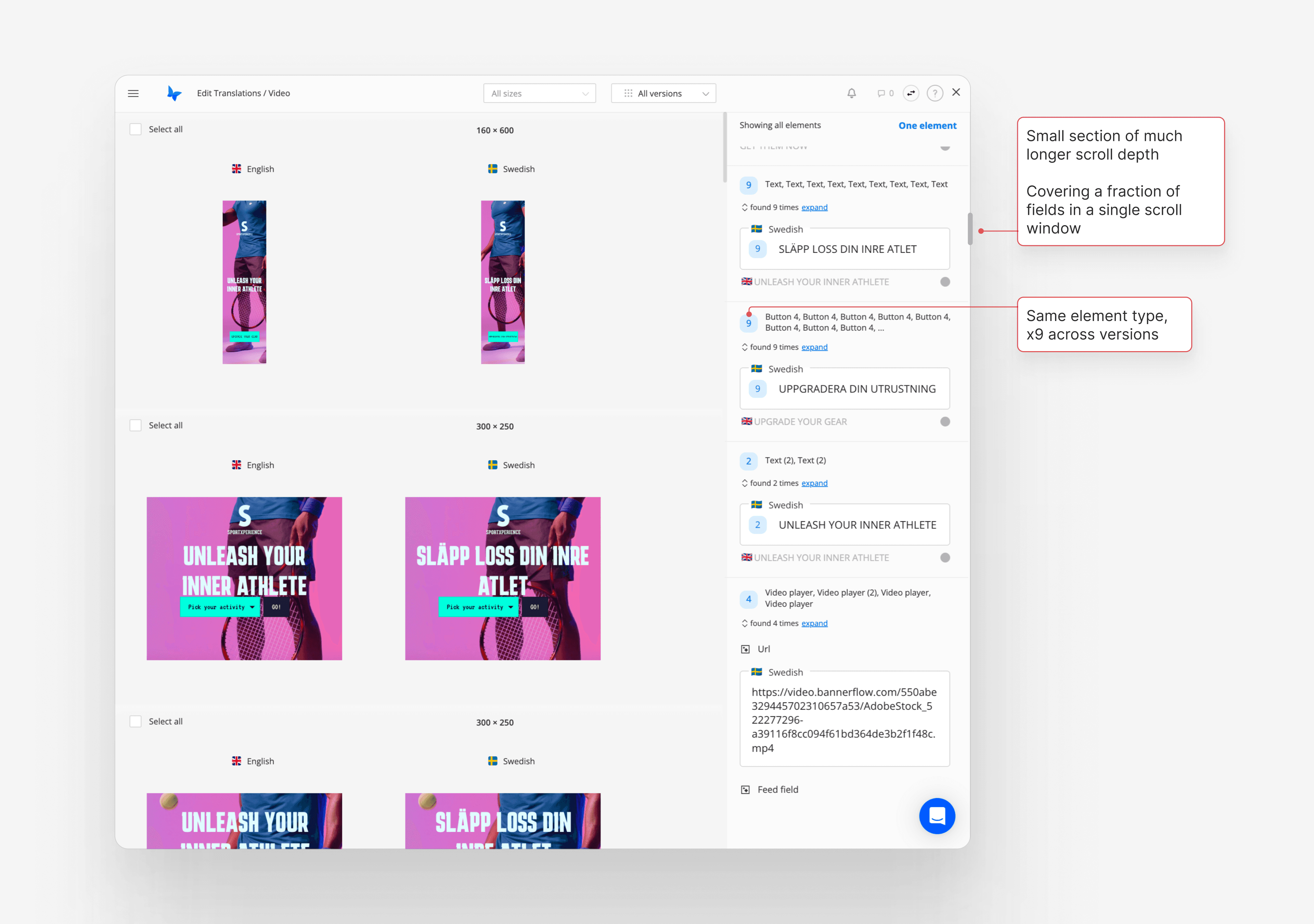
A creative set with only two language versions reaching already up to 40+ fields from disconnected elements
I distilled everything into three core user stories. The third one was where things got interesting.
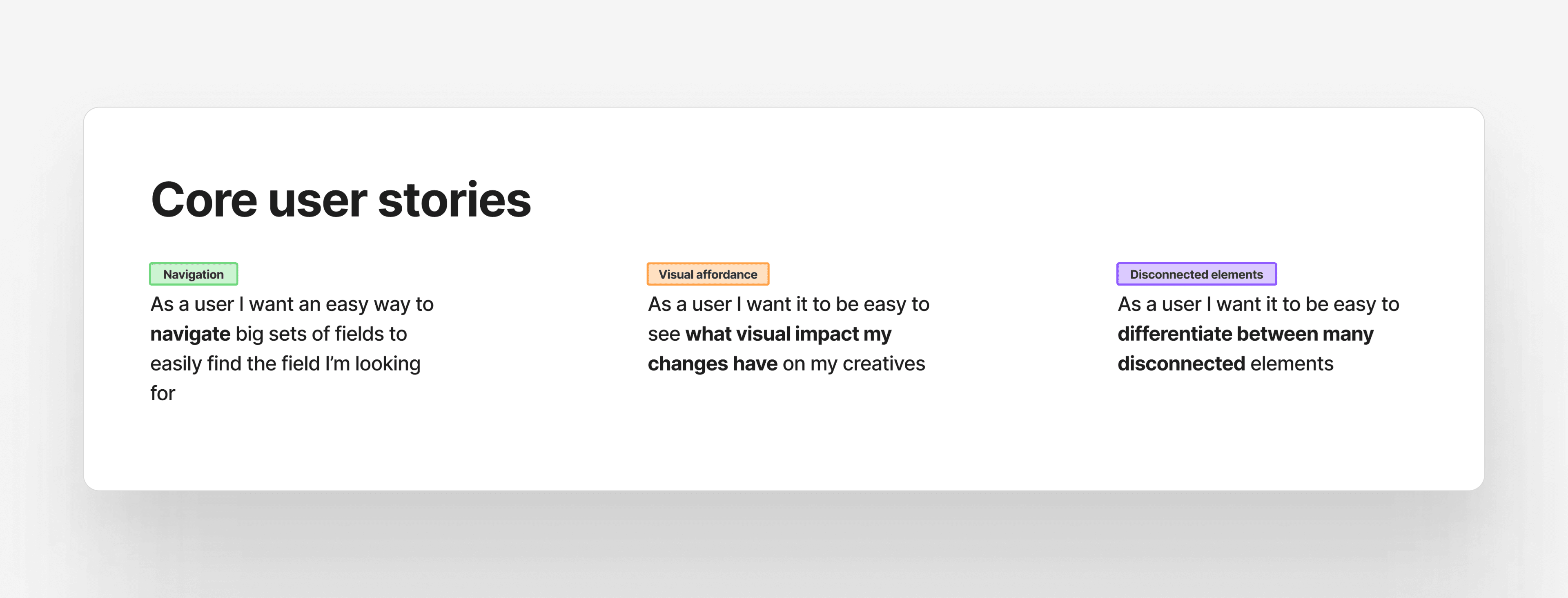
Three user stories derived from analysis; Navigation, Visual affordance & Disconnected elements
Diagnosing the real problem
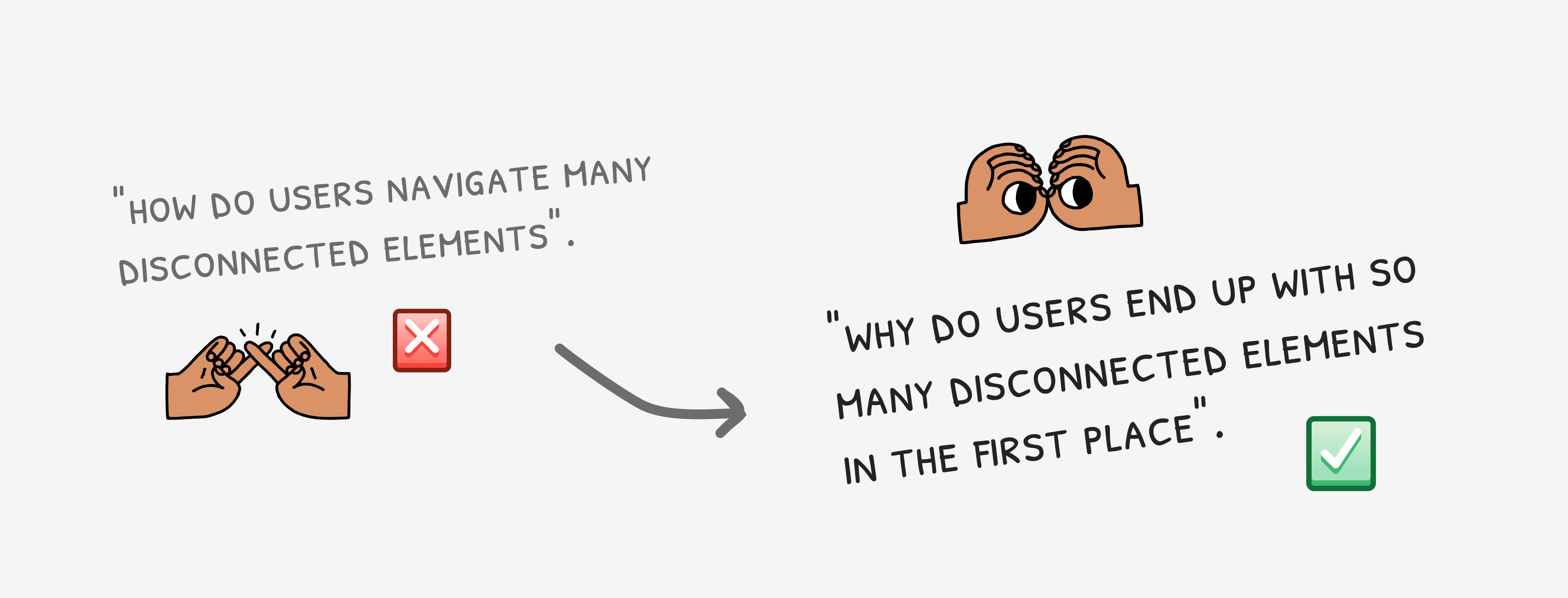
The "disconnected elements" issue was the one users felt most acutely, and initially the assumption was that it was a navigational problem, too many fields, poorly organised. But the more I dug in, the more I realised the question wasn't "how do users navigate many disconnected elements". It was "why do users end up with so many disconnected elements in the first place".
The answer traced back to a gap in the product's core scaling algorithm. Bannerflow's native scaling tools are designed to help users manage localisation across many sizes and language versions automatically. But the algorithm didn't account for relative positioning between grouped elements, meaning any design with grouped content would break unpredictably when scaled. Users hit this wall, found a workaround, and the workaround became standard practice.
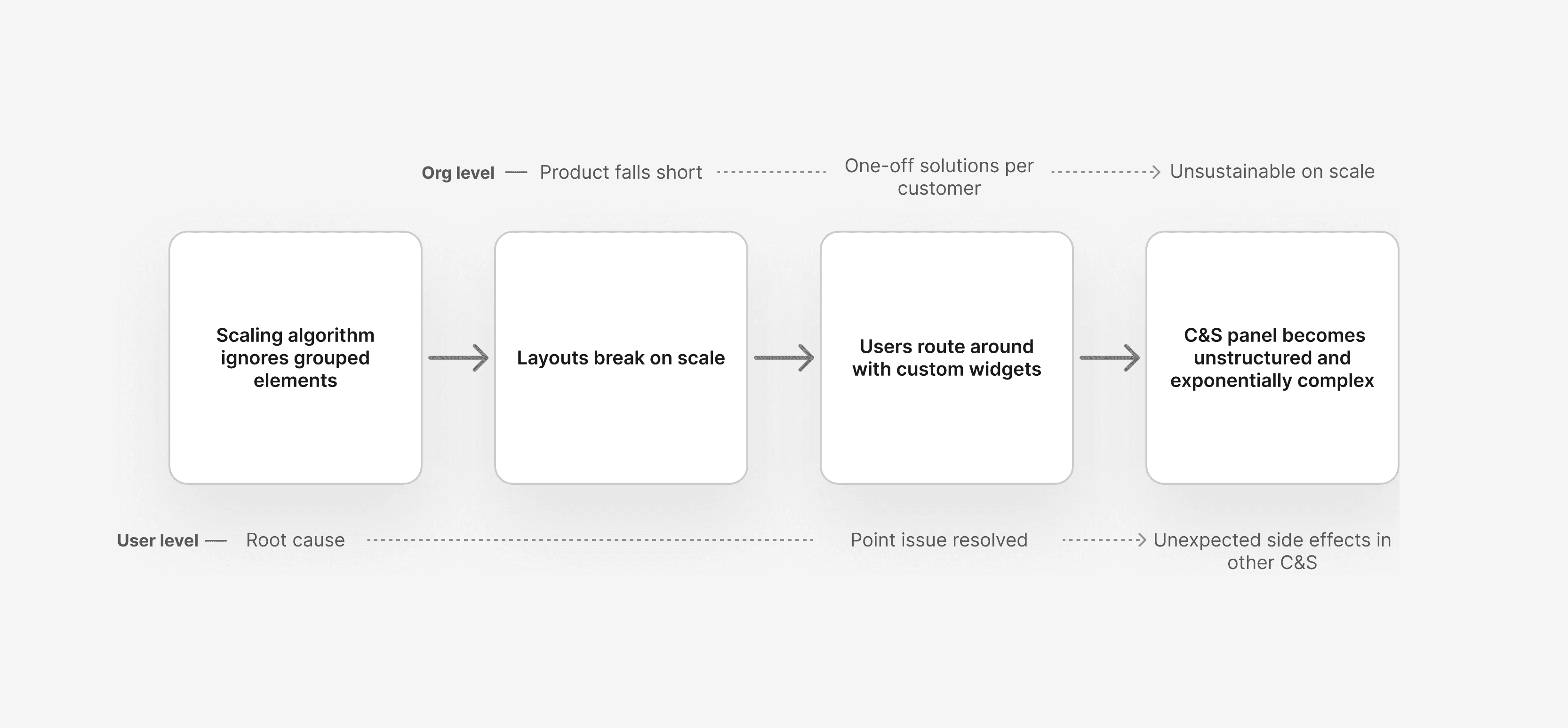
A diagram illustrating how the core issue of the C&S panel emerged
That workaround was custom widgets, a separate system maintained by the custom solutions team, built to serve individual power user requests faster than a full product implementation would allow. Functionally, it worked. Strategically, it created a secondary product living alongside the core one. A single widget could contain five or more fields. A user with a complex localisation setup might have nine disconnected widgets across different size and version combinations. Multiply that out and the Content & Styling panel became an exponentially growing list of fields with no clear structure.
This wasn't a design problem. It was an organisational one, and it wasn't mine to solve in this cycle.
This wasn't a design problem. It was an organisational one, and it wasn't mine to solve in this cycle.
The decision that shaped everything
When I brought this back to stakeholders, there was no resistance to the diagnosis. The widget complexity was already known internally, acknowledged as messy, but treated as a necessary trade-off to meet demanding customer needs. What my analysis added was clarity about the cost of that trade-off at the user experience level, and why a surface-level fix wouldn't meaningfully address it.
So I made the call, and I was transparent about it, to exclude the disconnected elements user story from this delivery. Not to deprioritise it, but to be honest that what I could realistically offer was a navigational improvement, not a resolution of the root cause. Attempting to fix it properly within this scope would have meant months of work restructuring something that lived in an entirely different part of the organisation. Attempting a band-aid would have meant shipping something that looked like a solution but wasn't.
Neither felt right.
To exclude the disconnected elements user story from this delivery
What I could do was make the existing complexity easier to consume: clearer groupings, better visual separation between elements, collapsible sections so users could tuck away the parts they didn't need right now. Not a fix, but a meaningful improvement to how users moved through a reality that wasn't going to change this cycle.
Outcome
Designing for clarity within constraints
With the scope defined, the design work became about precision rather than ambition. The goal was to reduce cognitive load for users navigating large, complex field sets, without restructuring the underlying architecture.
A few decisions stand out.
Structure over decoration
The most consequential wasn't a visual change at all, it was a framing one. By grouping widget properties with their parent elements and establishing a clearer visual hierarchy between elements and their fields, users could finally see where one thing ended and another began. What had been a single undifferentiated scroll became a structured list with discernible rhythm.
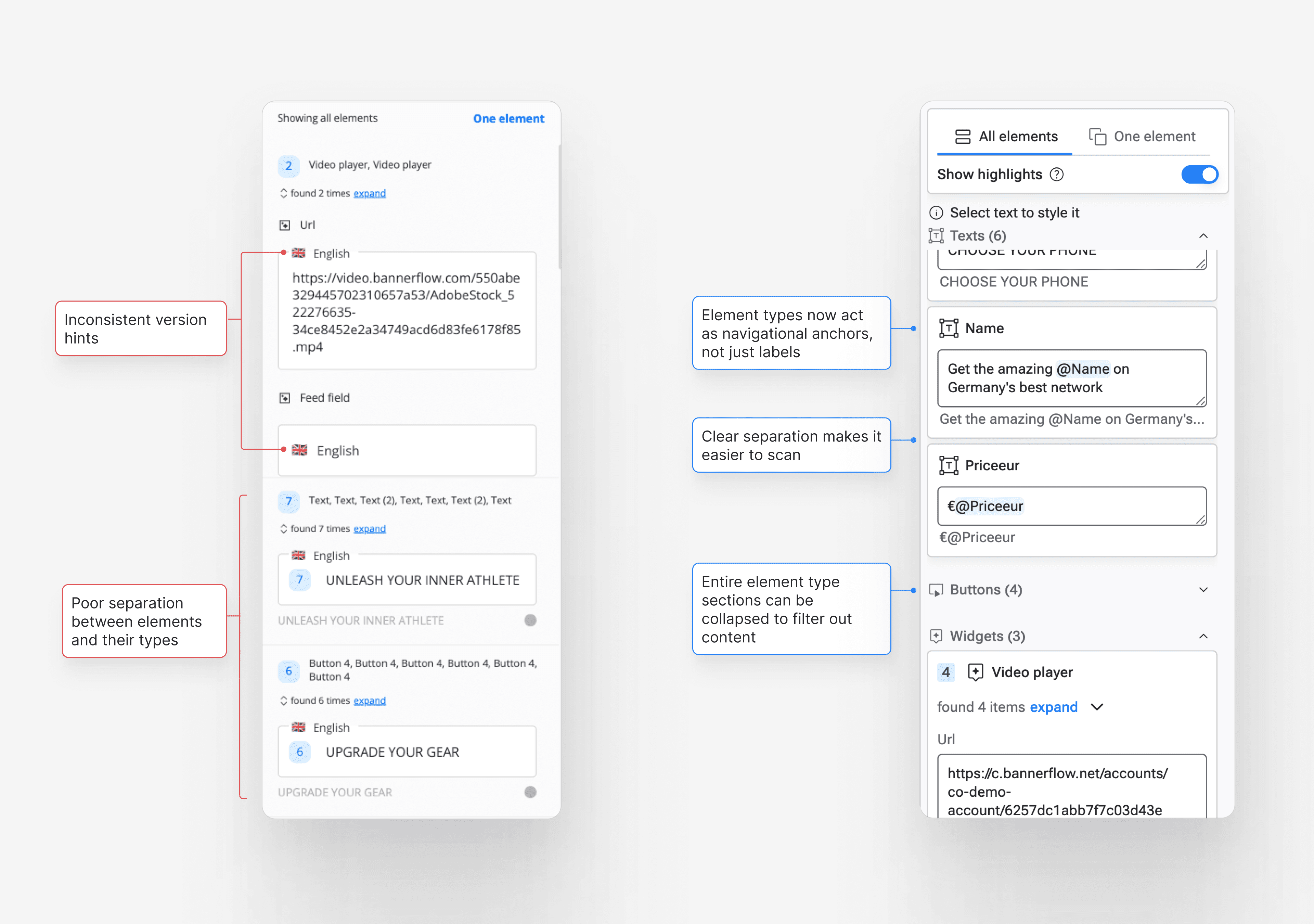
Before & after comparison: Visual hierarchy between fields and their elements
Removing information for clarity
A smaller decision that felt significant at the time: removing the language version indicator from individual fields in the primary working view. When a user has selected a specific language, that context is already established by the selector above, repeating the flag on every single field below it wasn't reinforcing clarity, it was creating visual clutter that made the actual content harder to read. In the all-versions view, where multiple languages appear simultaneously, the indicator earns its place. But in the default single-language mode, it was just noise. Removing it felt risky. In hindsight it was obvious. That's usually how the right call feels.
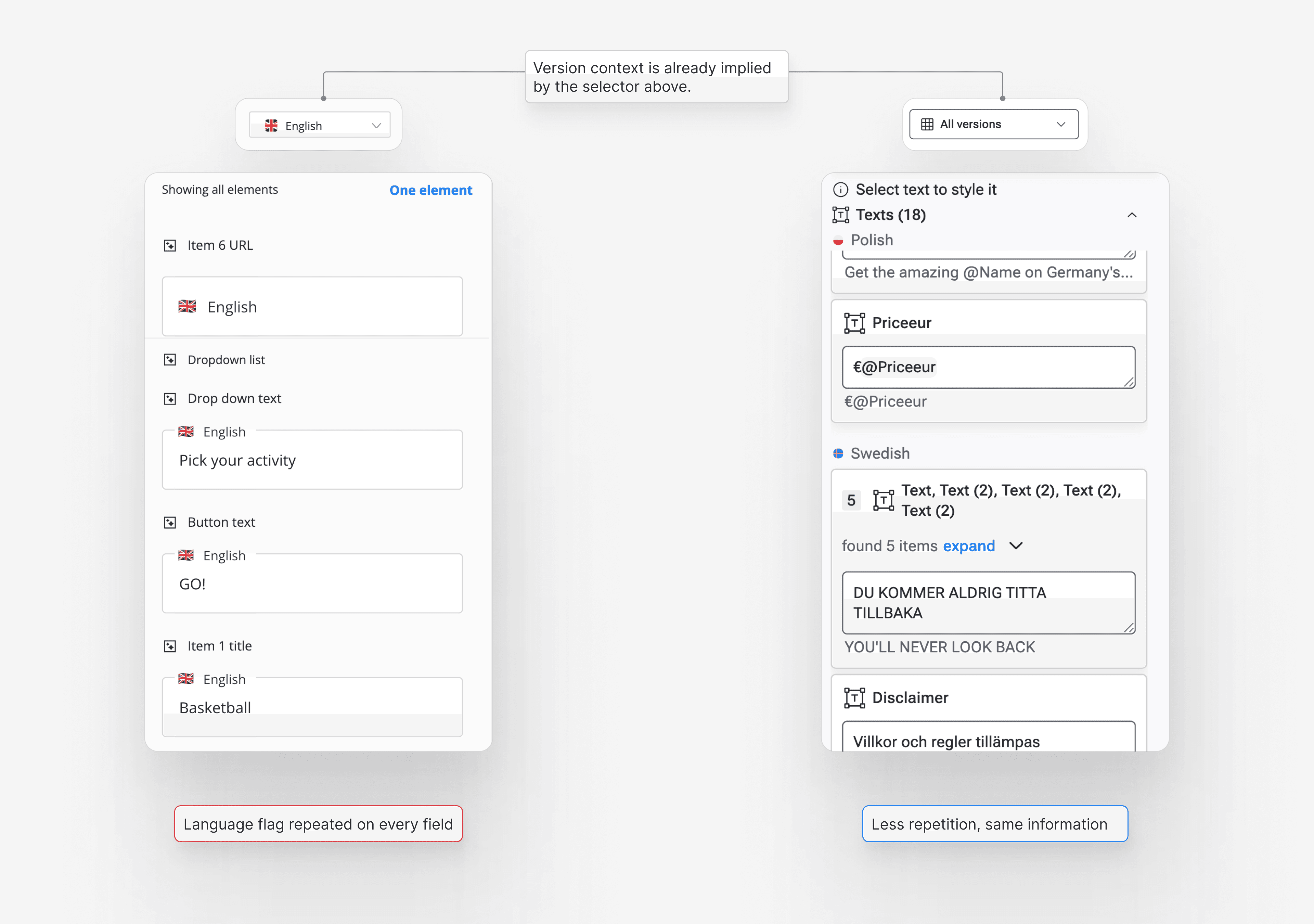
Before & after comparison: How language versions are communicated
Making complexity collapsible
The collapse behaviour gave users agency over their own complexity. Power users with nine widgets and forty-plus fields could now tuck away what they weren't working on and surface what they needed. It didn't solve the problem of having nine widgets. But it made living with nine widgets considerably more manageable.
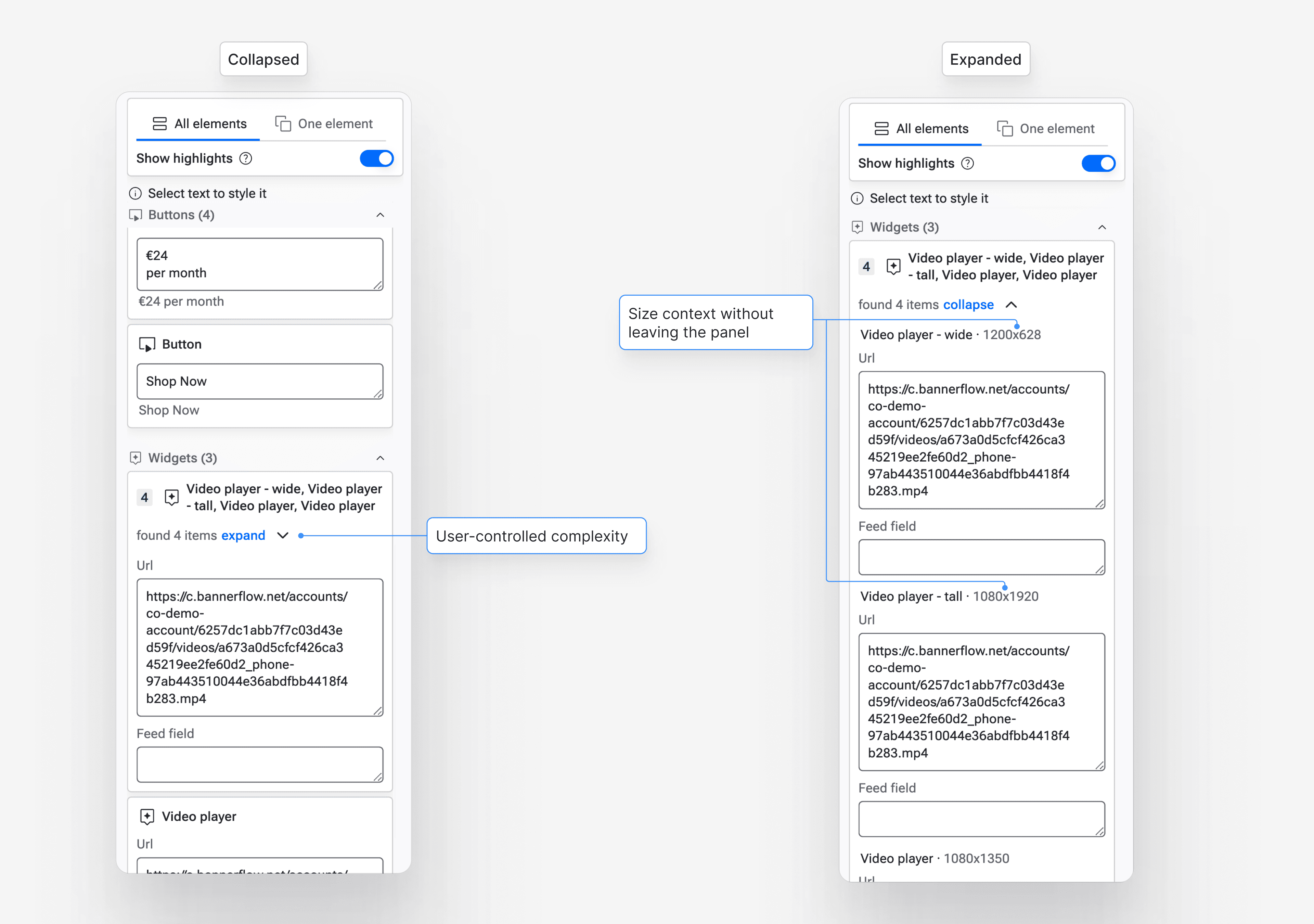
How users are able to control complexity caused by intricate widgets & disconnected elements
What solving it properly would actually require
The widget situation pointed at two distinct problems worth naming, because they have real solutions, just not ones that fit within a single feature cycle.
Scaling algorithm
The first is the scaling algorithm. The core reason users resort to custom widgets is that Bannerflow's native scaling doesn't handle grouped elements correctly, it ignores relative positioning within groups, causing layouts to break. Fixing that would remove the most common reason users reach for widgets in the first place, and would allow the platform's native localisation tools to do the job they were built to do.
Native property control
The second is version-level property control. Many custom widgets exist to let users show or hide parts of an element, a logo, a CTA, a subheading, depending on the version. If that capability were available natively at the version level, it would replace a significant portion of the custom widget use cases with something built into the product's own logic, making it maintainable, scalable, and visible to the whole team rather than hidden inside a bespoke setup.
Neither of these is a design sprint. Both require cross-functional investment and a conversation about what role the custom solutions team plays as the product matures. But they're the real resolution, and it felt important to name them clearly rather than pretend the problem had been solved.
What shipped, and for whom
The feature shipped. And the reception split in an interesting way.
Mid-size customers
Mid-size customers, the ones with moderately complex setups, saw a significant uplift in clarity. Users who had previously relied on elaborate element naming conventions just to keep track of what was what, or who had avoided creating complex designs because the localisation management felt too chaotic, could now navigate with confidence. The crutches came off.
Enterprise customers
Enterprise customers with the most advanced localisation needs still hit the ceiling. The widget complexity was still there, still unresolved at its root. The improvements made it easier to live with, but for power users running nine-widget setups across dozens of sizes, the fundamental issue remained. That was expected. It had been the honest framing from the start.
What I took from this
The most valuable thing I did on this project wasn't a design decision. It was knowing when to stop designing.
Identifying a root cause and then recommending that it not be addressed in the current cycle runs counter to the instinct to solve everything in front of you. But the alternative, shipping something that looked like a resolution without being one, would have created false confidence internally and unmet expectations externally. Neither serves the product or the user.
The clarity that came from naming the constraint honestly also freed up the design work itself. Instead of trying to compensate for an unsolvable structural issue through visual cleverness, I could focus on what genuinely mattered: making the existing experience as clear and navigable as possible for the users who needed it most.
Sometimes good design is knowing exactly what you're not solving, and why.